 BE VOICE
AI agents
Write what your agent says and knows
The Basics and Behaviour tabs are where you shape your agent: how it opens and ends a call, who it is, what it should do, and the facts it can answer from. You write them in plain English, the way you'd brief a new staff member.
How to change the greeting and closing
- Open AI agents, pick the agent, and open the Basics tab.
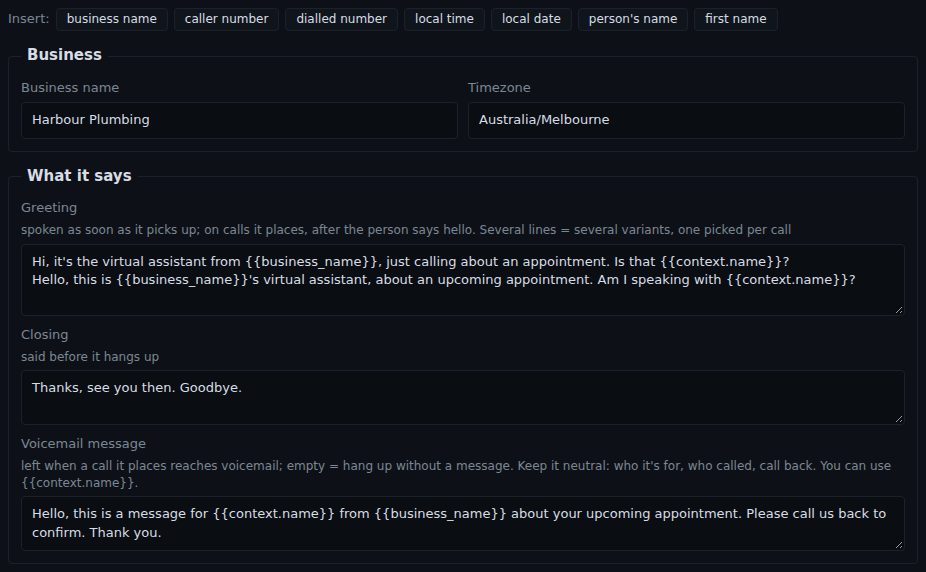
- Check Business name and Timezone (for example Australia/Melbourne). The agent uses these for its name and for the time and date.
- Type the Greeting: the first thing the agent says.
- Type the Closing: what it says before it hangs up.
- For agents that make calls, type the Voicemail message too (see below).
- Press Save.
- Greeting
- On a call to your business, the agent says it as soon as it picks up. On a call the agent makes, it waits for the person to say hello first. Keep it short and end with a question, such as "How can I help?"
- Greeting variants
- Put each version on its own line, and the agent picks one per call. Two or three versions stop regular callers hearing exactly the same words every time.
- Closing
- Said once the caller has what they need, just before the agent hangs up. For example: "Thanks for calling Harbour Plumbing. Have a great day. Bye!"
- Voicemail message
- Only for calls the agent makes. If the call reaches voicemail, the agent leaves this message. Leave it empty and it hangs up without leaving one. Keep it neutral: who it's for, who called, and a request to call back. Don't put private details in it, since someone else may hear it.
Placeholders: details filled in on each call
A placeholder is a word in double curly brackets that the agent swaps for the real detail on each call. Click in a box, then click a button on the Insert: row to add one where your cursor is. You can use them in the greeting, closing, voicemail message, persona, instructions and knowledge.
{{business_name}}(business name)- Your business name from the Business name box.
{{caller_number}}(caller number)- The number of the person on the other end of the call.
{{dialled_number}}(dialled number)- On a call to you, the number they rang. Handy if several of your numbers go to the same agent.
{{local_time}}and{{local_date}}- The time and date in your time zone, for example "3:05 pm" and "Monday 13 October 2026".
{{context.name}}(person's name) and{{context.first_name}}(first name)- On calls the agent makes, the name of the person being called, from the campaign's contact list. First name is the first word of the name, so "Am I speaking with {{context.first_name}}?" becomes "Am I speaking with Jordan?"
Any other column in a campaign's contact list works the same way: a column called appointment_time becomes {{context.appointment_time}}. When one AI agent hands a call to another, the details it passes on work like this too (see Handing a call to another AI agent). A placeholder with nothing to fill it is left out, so read your greeting through without it and make sure it still makes sense.
How to write the persona, instructions and knowledge
- Open the Behaviour tab.
- Fill in Persona, Instructions and Knowledge (explained below).
- Press Save, then Preview prompt to read everything the agent is told, with the placeholders filled in.
- Persona
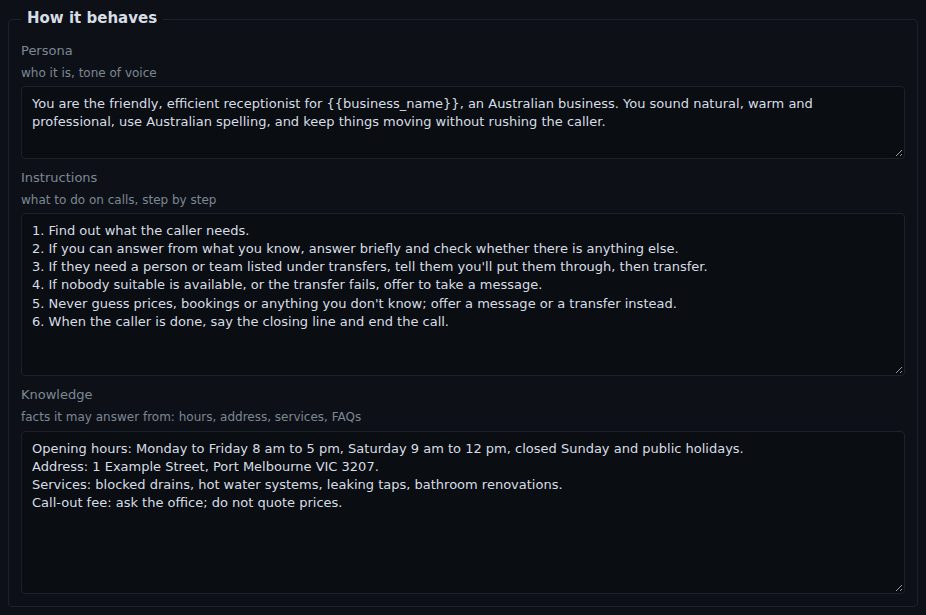
- Who the agent is and how it sounds. One or two sentences, for example "You are the friendly, efficient receptionist for {{business_name}}. You sound warm and professional and use Australian spelling."
- Instructions
- What to do on a call, step by step. A numbered list works best: find out what the caller needs, answer if you can, put them through if they need a person, otherwise take a message, then say the closing line.
- Knowledge
- The facts the agent may answer from: opening hours, address, parking, the services you offer, what to bring, common questions and their answers. The agent only answers from what's here. If something isn't in it, it says it doesn't know and offers a message or a transfer instead of guessing.
If the caller goes quiet
On the Behaviour tab, If the caller goes quiet sets what the agent does when nobody says anything.
- Check in, then hang up
- Ticked (the standard), the agent checks in when the line goes quiet, by asking "Are you still there?" or repeating its last question. If there's still no reply after the last check-in, it says a short goodbye and hangs up. Untick it to have the agent simply wait.
- Check in after (seconds)
- How long a silence lasts before the agent checks in, from 3 to 60 seconds. Leave it empty for the standard 7 seconds.
- Hang up after
- How many check-ins before it says goodbye: 1, 2 (the standard) or 3.
If the caller says "hang on" or "let me check", the agent waits about 30 seconds before it checks in. On a campaign call, a person who went quiet is tried again later.
Tips for good instructions and knowledge
- Write it like a briefing for a new receptionist. Plain sentences, one idea each.
- Number the steps in Instructions, in the order a call usually goes.
- Say what not to do. For example "Never quote prices; offer to have the office call back."
- Name your transfers the same way everywhere. If your instructions say "put urgent jobs through to Plumbers", have a transfer called Plumbers.
- One fact per line in Knowledge, with a label: "Opening hours: Monday to Friday 8 am to 5 pm."
- Answer the questions people really ask. Look at your recent calls and messages, and add the answers you find yourself giving again and again.
- Keep it current. Update public holiday hours and changes to services before they happen.
- Don't put private things in Knowledge, such as staff mobile numbers or door codes. Anything in it may be read out to a caller.
- Replace every "(fill in)" left by the role you started from.