 BE VOICE
Phone system
Hold callers in a queue until someone is free
A queue answers the call, plays music on hold, and puts the caller through to the next free person. Use it when several calls can come in at once and you'd rather callers wait than get no answer.
Make a queue
- Open Queues → + New queue.
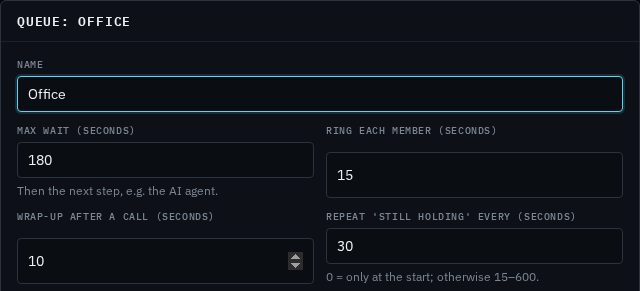
- Give it a Name, such as "Office".
- Set Max wait (seconds), Ring each member (seconds), Wrap-up after a call (seconds) and Repeat 'still holding' every (seconds). The starting values suit most businesses; see Options explained.
- Choose the Music on hold.
- Click Save.
- Click the new queue in the list, then add its members from Add a member…. See Members.
What the caller hears
- The queue answers and the caller hears a short message asking them to hold, then music.
- While they wait, a "still holding" message repeats as often as you choose.
- When a member is free, their phone rings. The caller keeps hearing music until the member picks up.
- If that member doesn't answer, the next free member is tried.
- If nobody has answered by the Max wait, the call moves to the next step in your call routing, such as voicemail or your AI agent.
The person who has taken the fewest calls from the queue is tried first, then whoever has been free the longest. Members ring one at a time, never all together.
Options explained
- Max wait (seconds)
- The longest a caller waits before the call moves on to the next step in your call routing. Between 5 and 3600 seconds (an hour).
- Ring each member (seconds)
- How long one member's phone rings before the next free member is tried. Between 5 and 120 seconds.
- Wrap-up after a call (seconds)
- A breather after each queue call, so a member can finish their notes before the next call rings. Between 0 and 600 seconds.
- Repeat 'still holding' every (seconds)
- How often callers hear a "still holding" message over the music. 0 plays the message only at the start; otherwise 15 to 600 seconds.
- Music on hold
- What callers hear while they wait. The default is your business's usual hold music; you can pick another track. Manage tracks on the Music on hold tab. See Music on hold.
Members
Members are the phones that take calls from the queue. Click a queue in the list to see its members on the left and the callers waiting on the right.
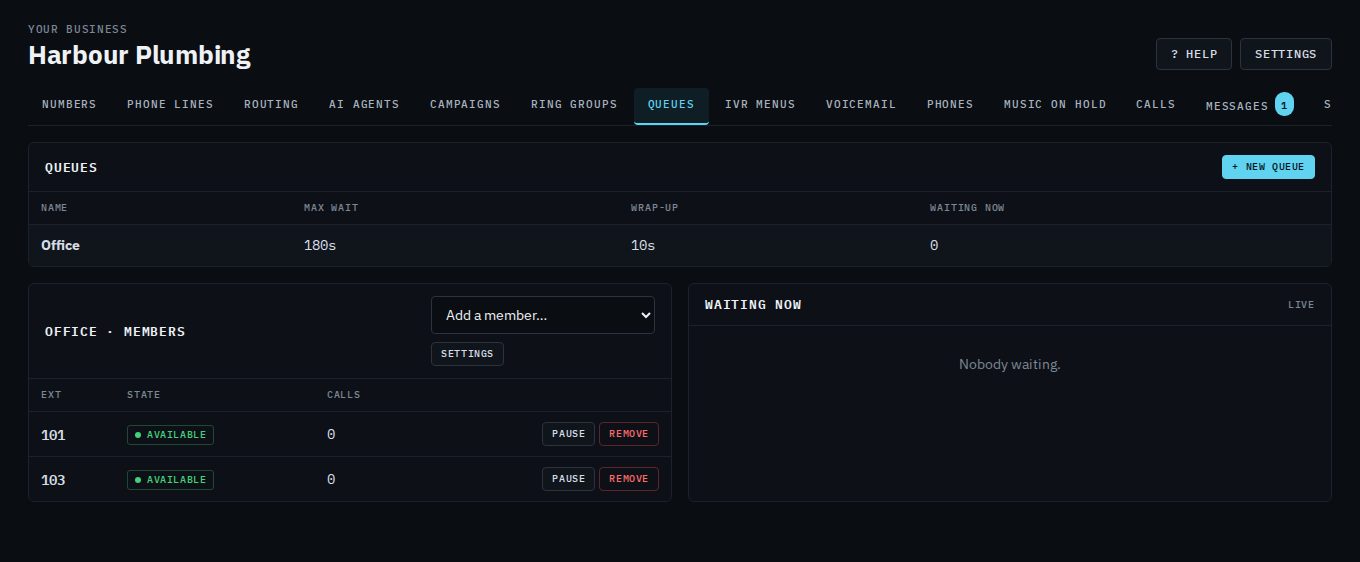
- Add a member: pick an extension from Add a member…. It's added straight away.
- Pause a member: click Pause when someone steps away, and Unpause when they're back. Paused members aren't offered calls but stay in the queue.
- Remove a member: click Remove.
- Change the queue's settings: click Settings.
The State column shows what each member is doing:
- Available
- Free and ready for the next call.
- Ringing or busy
- Their phone is ringing, or they're on a call.
- Wrap up
- Just finished a queue call; they'll be offered calls again after the wrap-up time.
- Paused
- Paused from this page; not offered calls.
- Logged out
- Their phone isn't signed in, so it can't ring.
The Calls column counts the queue calls each member has taken.
See who's waiting
The Waiting now panel updates every few seconds. For each caller it shows their position in the line, how long they've been waiting, their priority, and whether they're on hold or ringing a member. The Waiting now column in the list of queues shows the same count for every queue.
Send calls to a queue
- Straight from your number
- On the Numbers tab, choose the queue under What answers. See Your numbers.
- As a step in your call routing
- On the Routing tab, add a Queue step. The step can have its own Wait at most (seconds) (leave it empty to use the queue's max wait) and a Priority (0–10): callers with a higher priority are answered first. Connect what happens if nobody answers in time. See Routing steps.
Queue or ring group?
- Ring group
- Rings phones (together or in turn) for a set time, then moves on. The caller hears ringing. Good when someone can usually answer straight away. See Ring groups.
- Queue
- Answers the caller and holds them with music and messages until someone is free, sharing calls fairly between members. Good when calls can arrive together and waiting a minute or two is fine.
Delete a queue
Click the queue, click Settings, then Delete queue, and confirm. Check the Numbers and Routing tabs first for anything that sends calls to it.