 BE VOICE
For developers
API keys and basics
Every request to the BE Voice API and the MCP server is signed in with an API key from your console. This page covers getting a key and the rules every request shares.
How to get an API key
- Sign in to the console and open Settings → Integrations.
- Under API keys, click + New API key.
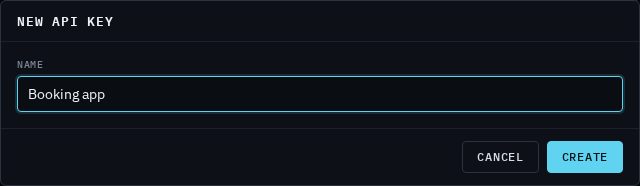
- Give it a Name that says where it's used, such as Booking app or Office assistant, then click Create.
- Copy the key straight away and store it somewhere safe, such as your app's secret store. It is shown once only.
- Click Done.

How to revoke a key
- Open Settings → Integrations.
- Find the key under API keys and click Revoke, then confirm.
Anything using that key stops working immediately: requests answer 401 unauthorized. Revoked keys stay in the list, marked Revoked. If a key may have leaked, revoke it and make a new one.
Your app can also manage keys with a key: POST /v1/tenants/{account_id}/api-keys with {"name": "…"} returns a new key once, GET lists them and DELETE …/api-keys/{key_id} revokes one. Your account ID (it starts tnt_) is under Settings → Business.
Sending requests
- Base address
https://voice.binaryelements.com. The API is under/v1/and the MCP server is at/mcp.- Sign-in
- Send the key in every request:
Authorization: Bearer bevk_xxxxxxxx…. Keys start withbevk_. A missing, wrong or revoked key gets401. - JSON
- Request bodies are JSON (send
Content-Type: application/json), up to 128 KB. Field names you don't need can be left out, but unknown fields are refused with400 invalid_json, so a typo never goes unnoticed. Replies are JSON in UTF-8, with times in RFC 3339. - Phone numbers
- In E.164:
+61400000000, not 0400 000 000. - Your account only
- A key sees only your business's calls and settings. Asking for something that isn't yours answers
404, the same as something that doesn't exist.
curl https://voice.binaryelements.com/v1/calls/cal_7h2kq9m4x8pz3vd61wtn \
  -H "Authorization: Bearer $BE_VOICE_KEY"
Errors
Every error has the same shape: a stable code for your program and a message for people.
HTTP/1.1 422 Unprocessable Entity
{"error": {"code": "do_not_call", "message": "+61400000000 is on this account's do-not-call list"}}| Status | What it means |
|---|---|
400 | invalid_json: the body isn't JSON, or has a field the endpoint doesn't take. |
401 | unauthorized: no key, a malformed header, or a wrong or revoked key. |
403 | module_off: the feature isn't part of your account (see below). |
404 | not_found: no such thing on your account. |
409 | The request doesn't fit the call's state now, such as call_ended or not_live. |
422 | A value was refused. The code says which: invalid_to, invalid_task, do_not_call and so on. Each endpoint's guide lists its codes. |
429 | tenant_busy: your account already has as many calls going out at once as it allows. Try again when one ends. |
500 | internal: something went wrong on our side. Try again; if it keeps happening, contact us. |
Placing a call only once: Idempotency-Key
A network error can leave you unsure whether a call was placed. Send an Idempotency-Key header (any unique string up to 255 characters, such as a UUID or your own job ID) with POST /v1/calls:
- The first request places the call and answers
201. - The same key with the same body returns the original call with
200. Nobody is rung twice. - The same key with a different body is refused:
422 idempotency_mismatch.
curl https://voice.binaryelements.com/v1/calls \
  -H "Authorization: Bearer $BE_VOICE_KEY" \
  -H "Idempotency-Key: booking-48213-reminder" \
  -d @call.json
IDs
IDs are opaque strings with a prefix that says what they are. Store them as text; don't parse them.
tnt_…- Your account.
cal_…- A call.
evt_…- A webhook event. Use it to spot a delivery you've already handled.
key_…,msg_…,agt_…,evt_…- An API key, a message, an AI agent, a webhook event.
Rate limits
To keep things fair and to stop a runaway script, the API and MCP have two limits:
| Limit | Standard | Counted for |
|---|---|---|
| Requests | 300 a minute | Each API key, and each connected app, separately. |
| Calls placed | 30 a minute | Your whole account, through the API and MCP together. |
Over a limit, the request is refused with 429 rate_limited and a Retry-After header saying how many seconds to wait. Wait that long and try again; an Idempotency-Key makes retrying a call safe. Through MCP, place_call returns a tool error saying when to try again, and the assistant can wait and retry. If your account needs higher limits, contact us. Using the console isn't limited.
Other limits you might meet:
- Calls at once. Your account may have a limit on calls going out at the same time. A call over it is refused with
429 tenant_busy; nothing is queued. - Polling. Rather than asking for a call's result over and over, use
?wait=on the result (see Follow, steer and get results) or a webhook. - Sizes. Each field of a call's brief has its own limit, listed in Place an AI call.
Seeing your usage
Settings → Integrations → API and MCP usage shows, for the dates you choose, how many requests were made, how many were over the limit and how many calls were placed. Group it by key or connected app, by channel (API or MCP) or by day, and click Export CSV to download it.
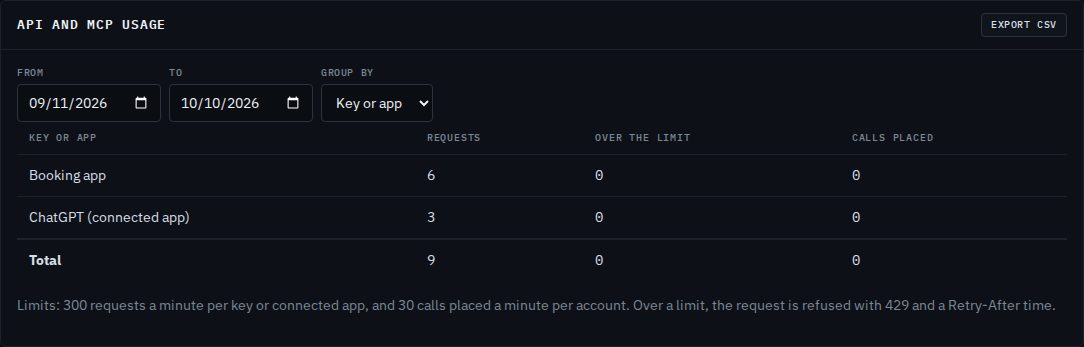
Your keys can read the same report: GET /v1/reports/api-usage, or /v1/reports/api-usage.csv for a CSV. Each account sees only its own usage.
What your account needs
| To use | Your account needs |
|---|---|
Placing calls with a task or callback_url, GET /v1/calls/{id}/result, POST /v1/calls/{id}/steer, and the MCP server | Calls through the API and MCP |
Reading a call (GET /v1/calls/{id}), hanging up, listing your calls, listing voices, managing your keys | Any API key |
| Your AI agent using your API during a call; campaigns from your system | AI agents, and Campaigns for campaigns. See Integrations for agents. |
Without the feature, the API answers 403 module_off with a message naming it. If your account doesn't include it, contact us.