 BE VOICE
Integrations for agents
Campaigns from your system
A campaign can take its list of people to call straight from your system at the start of each run, and send each person's result back as soon as it's known. Nobody exports spreadsheets, and your system stays the record of who was called and what they said.
Your system or an uploaded list
- A list I upload (CSV)
- Someone uploads a spreadsheet on the campaign's page. Each run calls that list as it was when the run started. Nothing to build: see Upload a contact list. Results stay in BE Voice (the run's page and its CSV), and can also be sent to your system with Also send each result to.
- My system sends the list (connection)
- At the start of each run, BE Voice asks your system who to call, then sends each result, and a summary at the end, back to it. You build two endpoints, described on this page.
Both use the same campaign settings: the AI agent, the number calls come from, the schedule, calling hours, attempts and rules. See Set up a campaign.
How to set it up
- Add a connection to your system in Settings → Integrations (see How to add a connection).
- Open Campaigns → + New campaign, or click a campaign and change its settings.
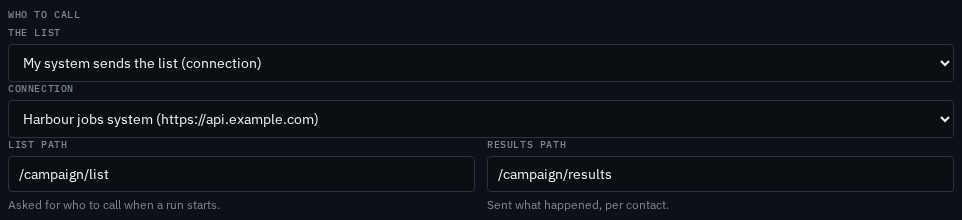
- Under Who to call, set The list to My system sends the list (connection).
- Choose the Connection, and set the List path and Results path on your API (by default
/campaign/listand/campaign/results). - Save, then try a test run to your own phone before turning the campaign on.
Both endpoints are called with POST on the connection's address, with its sign-in header and BE Voice's signature (X-BE-Voice-Timestamp, X-BE-Voice-Signature), exactly as for an agent's tools. Check the signature as described in Checking a request came from BE Voice.
The list request
When a run starts (on the campaign's days at its start time, or when someone clicks Run now or starts a test run), BE Voice sends:
POST https://api.example.com/campaign/list
Content-Type: application/json

{
  "event": "campaign.list",
  "campaign": {"id": "cmp_ycv5…", "name": "Overdue jobs follow-up"},
  "run": {"id": "run_3k9d…", "test": false}
}
Answer 200 with the people to call today:
{
  "contacts": [
    {
      "contact_id": "C-1042",
      "name": "Jordan",
      "phone": "0400 000 000",
      "timezone": "Australia/Melbourne",
      "context": {"job_number": "HJ-1042", "balance": "$240.00", "due": "2026-10-03"}
    }
  ]
}| Field | Type | What it does |
|---|---|---|
contact_id | string or number | Required. Your ID for the person, up to 100 characters, unique in the list. It comes back with their result. Entries without one, or repeating one, are left out. |
name | string | Their name, up to 100 characters. It's added to the context as name unless the context already has one. |
phone | string | National (0400 000 000) or international (+61400000000). A number that can't be read is skipped and reported as invalid_phone. |
timezone | string | Optional. A time zone name such as Australia/Perth; calling hours apply in the person's own time. Default: the campaign's. |
context | object | Optional. The facts the agent works from on this call, up to 8 KB. Anything else is skipped and reported as invalid_context. |
- Limits
- Up to 1,000 contacts per run, and an answer up to 4 MB. Answer within 30 seconds.
- When the list fails
- If your system can't be reached, answers with an error status, takes too long, or doesn't answer with
{"contacts": [...]}, the run fails and calls nobody. The run's page shows why, and the run summary (below) carries the reason inrun.error. - Before each call
- Numbers on your do-not-call list are skipped (
do_not_call), and the campaign's calling hours and contact limits are checked for each person.
How contacts and context reach the agent
Each contact's context becomes the facts for their call. The agent can use them in conversation, fill its greeting with them (for example {{context.name}}), and send them to your API through its tools without asking the person. Put in the IDs your tools will need, such as a job or invoice number, so the agent never has to ask for them.
Each result
Once a person is finished for the run (they answered, or there are no attempts left, or they were skipped), BE Voice sends their result to the results path:
POST https://api.example.com/campaign/results
Content-Type: application/json

{
  "event": "campaign.result",
  "campaign": {"id": "cmp_ycv5…", "name": "Overdue jobs follow-up"},
  "run": {"id": "run_3k9d…", "test": false},
  "contact_id": "C-1042",
  "call_id": "cal_8f2k…",
  "attempts": 1,
  "status": "done",
  "outcome": "promise_to_pay",
  "details": {"amount": "240", "date": "2026-10-17"},
  "note": "Will pay on Friday when the invoice is approved.",
  "summary": "Jordan agreed to pay the $240 balance on Friday 17 October."
}| Field | Type | What it does |
|---|---|---|
contact_id | string | Your ID from the list. |
call_id | string | The last call to them (cal_…). Empty if they were never called. |
attempts | number | How many times they were called in this run. |
status | string | done (answered), no_answer (not reached, or reached voicemail), or skipped (not called). |
skipped_reason | string | With skipped: why they weren't called: do_not_call, outside_limits, outside_hours, invalid_phone, invalid_context or not_allowed. |
outcome | string | How the conversation ended: one of the agent's outcomes, or voicemail when a message was left. Empty when nobody answered. |
details | object | The outcome's details, such as an amount or a date (text values). |
note | string | The agent's note on the call. |
callback | object | When the person asked to be called back: at (date and time with offset) and when (as they said it). |
opt_out | boolean | true when they asked not to be called again. Their number is already on your do-not-call list. |
summary | string | A short summary of the conversation. |
Fields that don't apply are left out. Answer any 2xx to take the result; the reply body is ignored.
Answers to the questions in the agent's script aren't part of this result. They're on the run's page in the console and in its Export CSV.
The run summary
When the run is over and every result has been taken (or given up on), BE Voice sends one more request to the results path:
{
  "event": "campaign.run.finished",
  "campaign": {"id": "cmp_ycv5…", "name": "Overdue jobs follow-up"},
  "run": {"id": "run_3k9d…", "test": false, "status": "done",
          "started_at": "2026-10-10T09:00:04+11:00", "ended_at": "2026-10-10T11:42:17+11:00"},
  "contacts": {"total": 4, "done": 2, "no_answer": 1, "skipped": 1},
  "outcomes": {"promise_to_pay": 1, "voicemail": 1},
  "results_not_taken": 0
}run.statusdone,stopped(someone stopped the run) orfailed. A failed run hasrun.error(for example, the list couldn't be fetched) andcontacts.total0.contacts,outcomes- Totals by status and by outcome. A stopped run that still had calls open when BE Voice stopped following it counts them in
contacts.unfinished. results_not_taken- Results your system never accepted within their hour of retries.
It's sent at once for a done or failed run; for a stopped run, once its last calls are over, or two hours after the stop at the latest.
Retries and repeats
- A result or summary that isn't answered with
2xxwithin 10 seconds is sent again after 1, 2, 4 and 8 minutes, then every 15 minutes, for up to an hour. - The same result can arrive twice (for example if your answer was lost). Use
contact_idwithrun.idas the key for a result, andrun.idfor the summary, and ignore repeats. - The list request is not retried: a run whose list fails ends there, and the next scheduled run asks again.
Test runs
A test run (Test run on the campaign's page) still asks your system for the list, then calls only the number you type, once, with the first contact's context. Its requests have "test": true in run, and its result is sent like any other, so your system can tell it apart and leave real records alone.
Starting the AI from your system
The same integration works the other way: your system can have the AI place calls and hear how they went.
| To | Your system |
|---|---|
| Have the AI call one person | Places a call through the BE Voice API with the facts for this call. The result arrives at your webhook when the call ends. See Place an AI call. |
| Have it work through a list | Provides the two endpoints on this page: one returns the people to call with the facts for each; the other receives each person's result, and a summary when the run is finished. |
| Trust what arrives | Checks the signature, and treats the call's ID (or contact_id with run.id) as the key for repeats. |
Either way, put the IDs your endpoints need (a job number, an invoice number) in the facts you send with each call, so the agent never has to ask the person for them.