 BE VOICE
For developers
Receive webhooks from BE Voice
BE Voice can tell your system when things happen: a call starts or ends, a call you placed has its result, the AI agent takes a message. Each is a signed JSON POST to an address you choose.
Ways to receive events
| Where you set it | What arrives |
|---|---|
| The call events address: Settings → Integrations → Call events | Call events (call.*), queue events (queue.*) and AI agent events (ai.*) for every call on your account, incoming and outgoing. |
callback_url on a call you place | call.result: that call's outcome, answers, summary and transcript, once, when it's final. |
| The message webhook: Settings → Messages and alerts → To a webhook | message.created: every new voicemail and every message the AI agent takes. |
To have your own software decide where an incoming call goes, rather than just hear about it, use the Webhook step in call routing. Campaigns that take their list from your system send each person's result back to it as well. See Integrations for agents: campaigns from your system.
How to get a call's result: callback_url
Add callback_url when you place a call. It must be https on the public internet. When the call has ended and its summary is written, BE Voice posts:
POST /hooks/be-voice HTTP/1.1
Host: app.example.com
Content-Type: application/json
User-Agent: be-voice-webhooks/1
X-BE-Voice-Timestamp: 1791609205
X-BE-Voice-Signature: sha256=5f0c3b8e1d…

{
  "id": "evt_3m8q2x7c1v9k4b6n0z5d",
  "type": "call.result",
  "created_at": "2026-10-10T05:13:29.017Z",
  "tenant_id": "tnt_8f2kd0w3m5q7r9t1v4xz",
  "data": {
    "call_id": "cal_7h2kq9m4x8pz3vd61wtn",
    "status": "completed",
    "final": true,
    "from": "+61370000000",
    "to": "+61400000000",
    "duration_sec": 74,
    "outcome": "completed",
    "result": {"outcome": "completed", "answers": {"window": "Friday 12-5"}, "note": "Ring on arrival."},
    "summary": "Sam confirmed delivery on Friday between 12 and 5.",
    "transcript": [{"speaker": "agent", "text": "…"}, {"speaker": "caller", "text": "…"}],
    "metadata": {"order": "A1002"}
  }
}
data is exactly what GET /v1/calls/{id}/result returns; Follow, steer and get results explains each field. It's also sent when nobody answers, with outcome no-answer, busy, failed or canceled. tenant_id is your account ID.
How to get every call's events: the call events address
- Open Settings → Integrations.
- Under Call events, enter your receiver's address (
https, on the public internet). - Click Save. To stop the events, clear the address and save.
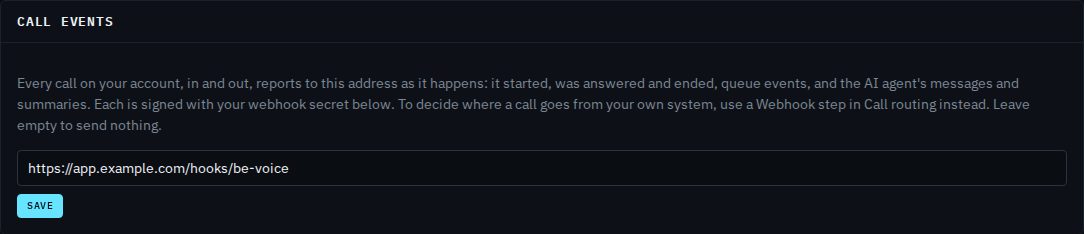
You can also set it through the API: PATCH /v1/tenants/{your account ID}/settings with {"events_url": "https://app.example.com/hooks/be-voice"}, or "" to clear it.
The events
| Event | When |
|---|---|
call.initiated | A call arrives on one of your numbers, or a call you placed starts ringing. |
call.answered | A call is answered. |
call.updated | The call reached a new kind of step. data.handler says which: ai (an AI agent, with data.ai.agent_id), menu or voicemail. |
call.ended | The call is over: status, duration_sec and hangup_cause are final. |
queue.entered, queue.exited, queue.timeout | A caller joined a queue (with their position), left it (reason answered, with who answered, or hangup), or waited too long and moved on (max_wait or no_agents). The details are in data.queue, with wait_sec. |
ai.transfer | The AI agent is putting the caller through to someone (data.ai.transfer: name, target and how it went). |
ai.message | The AI agent took a message: data.ai.message with summary and the details it collected. |
ai.summary | The AI conversation is over: summary, transcript, how it ended (outcome), and the agent's result if it ended with one. |
Every event's data is the call (the same fields as GET /v1/calls/{id}) plus the extra object for that event. A call's events arrive in the order they happened.
{
  "id": "evt_9w2d5k8r1m4q7t0x3c6v",
  "type": "ai.message",
  "created_at": "2026-10-10T01:19:40.552Z",
  "tenant_id": "tnt_8f2kd0w3m5q7r9t1v4xz",
  "data": {
    "id": "cal_2n5r8u1x4a7d0g3j6m9p",
    "tenant_id": "tnt_8f2kd0w3m5q7r9t1v4xz",
    "direction": "inbound",
    "from": "+61400000000",
    "to": "+61370000000",
    "status": "in-progress",
    "duration_sec": 0,
    "created_at": "2026-10-10T01:18:02.114Z",
    "answered_at": "2026-10-10T01:18:03.020Z",
    "ended_at": null,
    "ai": {
      "agent_id": "agt_4k8p2w6r0t3y7u1i5o9e",
      "message": {"summary": "Jo has a blocked drain at the back of the house.", "details": {"name": "Jo", "suburb": "Port Melbourne"}}
    }
  }
}
How to get every message: the message webhook
- Open Settings → Messages and alerts.
- Under To a webhook, enter your receiver's address.
- Click Send a test. Your receiver gets a sample
message.testevent, and the console tells you whether it answered. - Click Save.
Each new voicemail and AI message then arrives as message.created, after the call ends. It works with or without email, and missed calls aren't sent. An AI agent can have its own webhook for the messages it takes, set in its editor under Messages; see Messages and alerts.
{
  "id": "evt_6t1y4u7i0o3p5a8s2d9f",
  "type": "message.created",
  "created_at": "2026-10-10T01:20:00.000Z",
  "tenant_id": "tnt_8f2kd0w3m5q7r9t1v4xz",
  "data": {
    "message": {
      "id": "msg_4h7j0k3l6z9x2c5v8b1n",
      "kind": "ai_message",
      "caller": "+61400000000",
      "summary": "Jo has a blocked drain at the back of the house.",
      "details": {"name": "Jo", "suburb": "Port Melbourne"},
      "agent_id": "agt_4k8p2w6r0t3y7u1i5o9e",
      "status": "new",
      "created_at": "2026-10-10T01:19:40.000Z"
    },
    "call": {"id": "cal_2n5r8u1x4a7d0g3j6m9p", "from": "+61400000000", "to": "+61370000000", "created_at": "2026-10-10T01:18:02.114Z"}
  }
}
A voicemail has "kind": "voicemail", its length in seconds, the mailbox's mailbox_id and mailbox_name, and a recording_url. Fetch the recording with one of your API keys in the Authorization header.
How to check a webhook came from BE Voice
Every webhook is signed with your account's webhook secret (it starts whsec_). Find it in Settings → Integrations → Webhook secret: click Show or Copy. Keep it secret, like an API key.

Replace makes a new secret and the old one stops working at once: every webhook and every tool call to your systems is signed with the new one from the next event. Update your systems straight after, or they'll reject what BE Voice sends. Only people signed in to the console can see or replace the secret; API keys can't, so a leaked API key can't be used to fake our webhooks.
Two headers come with each request:
X-BE-Voice-Timestamp- When it was sent, in Unix seconds.
X-BE-Voice-Signaturesha256=followed by the hex HMAC-SHA256 of the timestamp, a full stop, and the raw request body (for example1791609205.{"id":"evt_…",…}), keyed with your webhook secret.
- Read the body as raw bytes, before any JSON parsing. Parsing and re-encoding changes the bytes and breaks the signature.
- Reject a timestamp more than 5 minutes from your clock. That stops an old request being replayed.
- Work out the signature yourself and compare it to the header with a constant-time comparison.
- Only then parse the JSON and act on it.
In Node.js with Express:
import crypto from "node:crypto";
import express from "express";

const SECRET = process.env.BE_VOICE_WEBHOOK_SECRET; // whsec_…
const app = express();

app.post("/hooks/be-voice", express.raw({ type: "application/json" }), (req, res) => {
  const ts = req.get("X-BE-Voice-Timestamp") || "";
  const sig = req.get("X-BE-Voice-Signature") || "";
  const want = "sha256=" + crypto.createHmac("sha256", SECRET)
    .update(ts + ".").update(req.body).digest("hex");
  const fresh = !(Math.abs(Date.now() / 1000 - Number(ts)) > 300);
  const ok = fresh && sig.length === want.length &&
    crypto.timingSafeEqual(Buffer.from(sig), Buffer.from(want));
  if (!ok) return res.sendStatus(401);

  const event = JSON.parse(req.body);
  res.sendStatus(204);   // answer first...
  handle(event);         // ...then do the work
});
In Python:
import hashlib, hmac, time

def verify(secret: str, ts: str, sig: str, body: bytes) -> bool:
    if abs(time.time() - int(ts)) > 300:
        return False
    mac = hmac.new(secret.encode(), ts.encode() + b"." + body, hashlib.sha256).hexdigest()
return hmac.compare_digest("sha256=" + mac, sig)Responding, retries and duplicates
- Answer quickly with any 2xx. Anything else, or no answer within a few seconds, counts as a failure. Do slow work after you've replied. The body of your reply is ignored.
- Call events and
call.resultare sent once. If your receiver is down, they aren't sent again. For calls you placed,GET /v1/calls/{id}/resultalways has the result, so check it for any call you didn't hear about. message.createdis tried up to three times, a few seconds apart. The message is also always on the console's Messages tab.- Handle each event once. Every event has its own
id(evt_…), the same on each try. Store the IDs you've handled and skip repeats. Forcall.result, thecall_idworks just as well.