 BE VOICE
Phone system
Ring several phones with a ring group
A ring group is a set of phones that ring for one call. Use it when a call can be taken by any of several people, such as "the plumbers" or "the office".
Make a ring group
- Open Ring groups → + New ring group.
- Give it a Name, such as "Plumbers".
- Choose How it rings: All at once (first to answer) or One at a time, in order.
- Set the Ring time (seconds).
- Under Members, tick the phones that should ring.
- Click Save.
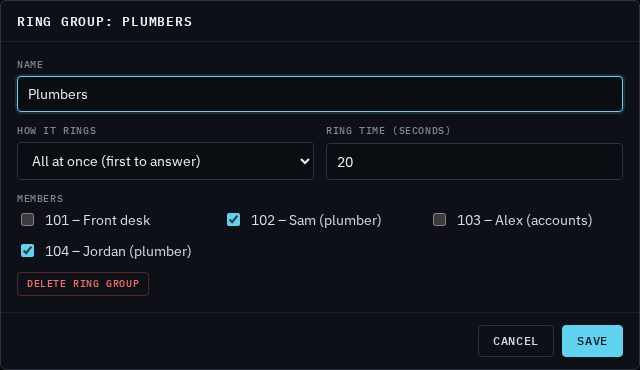
Members are the phones on the Phones tab. If there aren't any yet, add them first: see Phones and extensions.
Options explained
- All at once (first to answer)
- Every member's phone rings at the same time. The first person to pick up gets the call, and the others stop ringing. Best when it doesn't matter who answers, as long as someone does quickly.
- One at a time, in order
- Also called hunting. The first phone rings, and if nobody answers it, the next one rings, and so on down the list. Phones ring in the order they're listed. Use this when there's someone who should normally take the call, with others as backup.
- Ring time (seconds)
- For All at once, how long the phones ring before the call moves on. For One at a time, how long each phone rings before the next one is tried. Between 5 and 300 seconds; 20 is a good start.
- Members
- The phones in the group. Only phones that are signed in (online) can ring.
Send calls to a ring group
A ring group does nothing until calls are sent to it. There are two ways:
- Straight from your number
- On the Numbers tab, choose the ring group under What answers. Every call to the number rings the group. See Your numbers.
- As a step in your call routing
- On the Routing tab, add a Ring group step. You can give the step its own Ring for (seconds), or leave it empty to use the group's ring time. Then connect what should happen if nobody answers, such as voicemail or your AI agent. See Routing steps.
Change or delete a ring group
The Ring groups tab lists each group with how it rings, its ring time and its members.

- Change it: click the group, make your changes and click Save. Changes apply from the next call.
- Delete it: click the group, then Delete ring group, and confirm.
Ring group or queue?
A ring group rings phones for a short time, then moves on. A queue answers the caller and keeps them on hold with music until someone is free. Use a ring group when you can usually answer straight away; use a queue when several calls can arrive at once and callers may need to wait.